Introducing VCA’s in ShowScript 1.0.35
We’re proud to add another powerful building block to the ShowScript programming language: VCA’s.
A VCA (Voltage Controlled Amplifier) is a concept that originates from analog audio consoles, where a control voltage would drive an amplifier. ShowScript doesn’t use voltages internally, but it adopts the same idea: a VCA is a scalar that multiplies the final output level of a group of channels, like a master dimmer for audio, DMX, analog outputs, and more.
Think of it as a master dimmer you can attach to any collection of devices.
What is a VCA?
A VCA is a scalar control that multiplies the final output level of its members.
- When a VCA is at 1.0, members are unaffected.
- When a VCA is at 0.5, members output at half their normal level.
- When a VCA is at 0.0, members are effectively muted/blackout.
This scaling happens after the channel’s own logic and automation, which is what makes VCA’s so useful for real-world show control.
Unlimited groups, unlimited members
In ShowScript:
- There is no limit to the number of VCA’s you can create.
- There is no limit to how many devices/channels can be a member of a VCA.
- Members can be mixed output types (audio + DMX + analog in the same group).
That means you can build VCAs around logical show concepts (“Zone A”, “Queue line”, “Ride Scene 3”) instead of being constrained by technical output types.
Multiple VCA membership and nesting
A single output can be a member of multiple VCA’s at once. In that case, the output is scaled by each VCA in the chain.
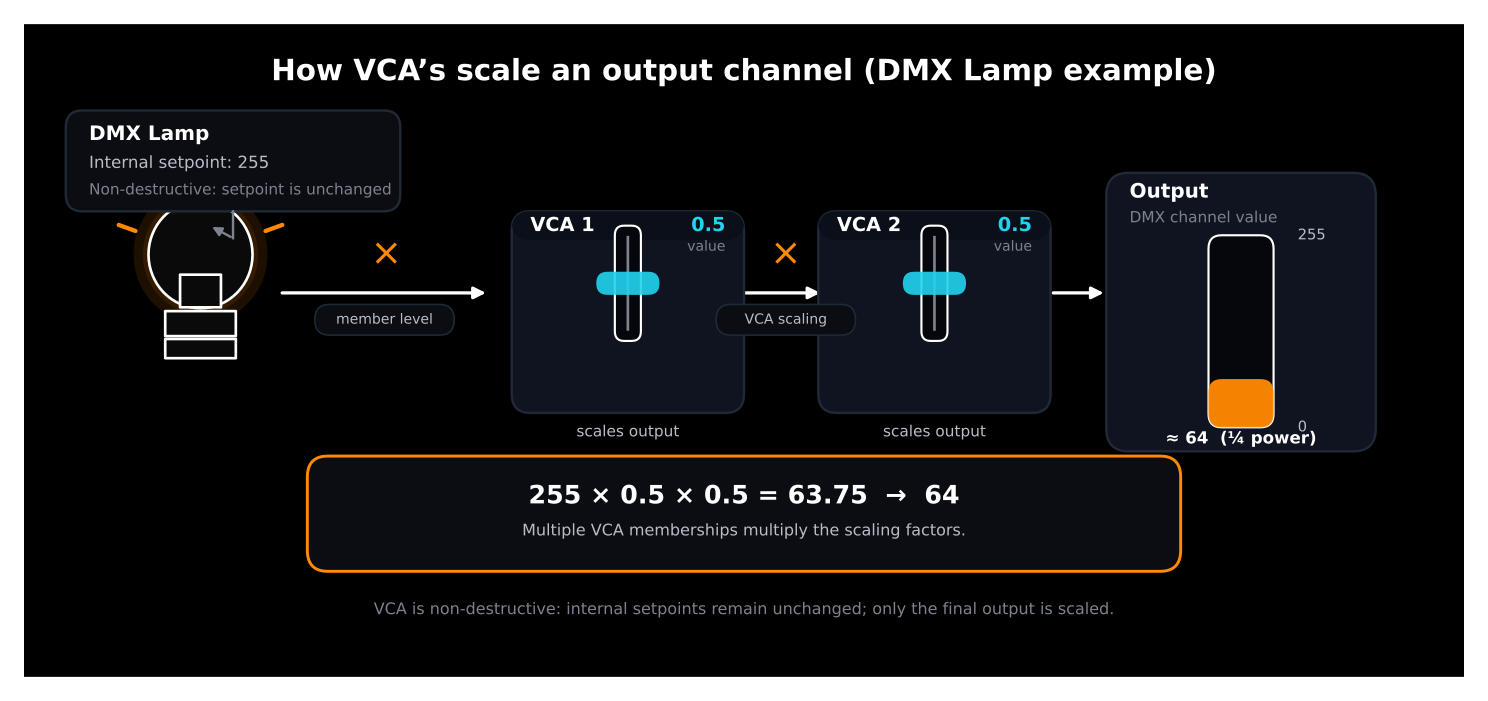
Example:
- Lamp setpoint = 255
- VCA 1 = 0.5
- VCA 2 = 0.5
Result:
- 255 × 0.5 × 0.5 = 63.75 → 64 (DMX quarter power)
This also enables nesting:
- A VCA can be a member of another VCA
- You can build master + sub-dimmers, zone hierarchies or layered control structures
This is perfect for scenarios like:
- A global “Master Dimmer”
- Per-area dimmers
- Per-scene dimmers
- A safety or “kill” layer on top
Non-destructive by design
One of the most important properties of VCA’s in ShowScript is that they are non-destructive.
A VCA:
- never modifies an output channel’s internal setpoint
- acts as a post-processing scaler on the final output
So if a channel already has automation running, fades, cues, envelopes, reactive behavior, those setpoints remain intact. The VCA simply scales the result.
This is extremely valuable when dimming groups of channels because:
- each device’s programmed intensity/gain is preserved
- relative balances stay correct
- you can “ride” the group level without fighting existing automation
In other words: you can dim an entire area without breaking the show logic that drives each individual output.
Practical use cases
VCA’s are a simple concept that unlock a lot of high-level control:
-
Control audio levels of entire zones with one parameter
(e.g., queue line / pre-show / ride audio zones) -
Control light levels (including RGB) of entire zones with one parameter
(maintaining color balance while scaling brightness) -
Create master dimmers for user-defined logical or functional device groups
(e.g., “Scene 4 practicals”, “Facade lighting”, “Atmosphere FX”) -
Build kill-switches for groups of devices
(e.g., instantly mute a room, blackout a scene, disable a subsystem)
Full automation: make spaces breathe
VCA channels can be fully automated, just like any other controllable parameter in ShowScript.
That means you can:
- let entire rooms or sections breathe (slow intensity or gain movement)
- create dynamic transitions between zones
- drive VCA values from external inputs (sensors, triggers, control systems)
- build crowd-aware audio behavior, where zones gain-compensate based on occupancy or activity
Because scaling is non-destructive, you can layer this on top of existing programming without rewriting your base show logic.
Summary
VCA’s bring a clean, scalable way to control groups of outputs across the entire ShowScript ecosystem:
- Works across any output type
- Supports unlimited groups and members
- Allows multiple memberships and nesting
- Is non-destructive (setpoints remain unchanged)
- Can be fully automated
If you’re building complex shows, theme parks, interactive spaces, multi-zone audio, large lighting rigs, VCA’s are the tool that lets you control the system at a higher level, without sacrificing the detail inside each channel.